Summary: Incorporating ICT in Class
Based on the posts I have read, it is clear that classroom management plays a critical role in ensuring that lessons will proceed smoothly. This is especially more pertinent in computer laboratories where the setting makes it harder for the teacher to monitor what the students are doing (e.g. they are hidden behind their computer screens).
I agree with Jing Xun that Mrs. Xing became too preoccupied with her lesson plan and did not improvise on the spot. For example, when students who have completed their work earlier started to disrupt the rest in class, she should have given them another task. In this case, she could have provided a peer editing task to free herself from editing the students’ work and assist students who are not too familiar with working with computers.
Based on the problems she faced, it is clear that prior detailed planning is essential, and there is a need to preempt difficulties that can arise in class. As highlighted in numerous posts including my own, she could have assigned seats according to familiarity with computers so students can help each other. If this sounds too ideal (students may not want to assist), using the paper cup system was shown in the Secondary Class video will be useful.
I also like Adam’s idea of having a Wiki Page where students can refer to instructions. This is an alternative to showing it on the screen in front of class as I suggested. Either way, it helps students keep on track, and will have no excuses when they hand in assignments which do not adhere to the requirements.
..............................
Reflection
Doubts - Can anyone please clarify?
We have established in the first lesson that ICT needs to be two-way. Hence, documentaries are not considered as ICT tools while youtube videos are. However, while reading the text (pp.143-5) I came across the one-PC per classroom scenario and the example provided was one which used a powerpoint presentation, showing video clips etc. The example explained that the teacher would show slides/video and get responses from the students. I suppose that is a two-way communication, but done offline? If that is the case, then the examples of non-ICT tools we thought of in week one would then be considered ICT? Hmmmm confusing stuff indeed. What are your thoughts on this?
After doing e-learning for two modules, I learnt that it is an effective method to get tangible work from students. While we usually sit in class, discuss certain issues and then head home, we now have to read up, think, and produce something at the end of the week. However, I do not think this is very significant change in secondary schools as students usually do get worksheets to complete anyway. It is different in tertiary institutes as we usually only need to produce one paper per module at the end of the semester (and those which require more than one will be termed ‘killer mods’ and students will hesitate before picking those).
What do I think of e-learning? It is definitely useful for SDL as the teacher will not be around to guide them every step of the way. This autonomy also givess the students a sense of responsibility for their learning as they have after all chosen to move in that particular direction. Also, their peers can learn from their work.
I learnt that it is useful to delineate the deliverables at the end of the e-learning session clearly as students can easily refer to the list and check whether they have completed the required tasks. Providing a choice for the activities (all related to a fixed theme/topic) is also useful in facilitating CL as students can learn from their peers the issues they have decided not to concentrate on.
Sunday, September 6, 2009

Scenario One, activity B: pre-emptive/ intervention strategies
The computer lab became an unfavourable learning environment for the students in Mrs Xing’s class due to poor classroom management on her part.
Mrs Xing faced a class of mixed abilities—some know how to use the internet, others did not. She could have given out a set of instructions of what to do before the lesson started. The class was also distracted. She should have set firm ground rules, such as disallowing her students to log on to the internet unless she gave the go-ahead (Chai and Wang eds., 2010).
In addition, since the school recently acquired tablet PCs, Mrs Xing could have brought a few extra tablet PCs to class in case any of the computers failed to work. During our QED 527 lessons, I noticed whenever we had lessons in the MXL lab, Dr Tan would make sure to bring extra laptops for those who did not have laptops.
An ICT lesson must be coupled with non-ICT tools, effective classroom management skills and organization skills (Chai and Wang eds. 2010). Mrs Xing was too concerned about her task to integrate ICT in her lessons. In the secondary video, the teacher utilized non-ICT tools to manage the class, i.e.: Blue and Red cups to signal for help and classroom lights to signal attention. Furthermore, Mrs Xing neglected to account for those who finished their work early. Once again, she should have pre-empted it by preparing lesson fillers (crossword puzzles) to occupy them. Once again, an ICT lesson does not have to solely rely on ICT tools.
Mrs Xing did not make full use of what an ICT lesson could provide. The lesson was too teacher-oriented; she could have gotten the class to collaborate in marking each other’s assignments through putting their essays up on Google documents.
With regards to the poor quality of assignments handed in, Mrs Xing overestimated her students’ ability to made effective use of the internet to produce good essays. She could have provided starting or supporting resources so that students would not waste time researching or finding the wrong material—this prevents the submitting of poor quality assignments (Chai and Wang eds. 2010).
We also learnt that Mrs Xing’s lesson plan was not even one-third complete—perhaps it was too tedious with too many SIOs. Breaking down the lesson into mini tasks, with timelines and milestones and coming up with a more detailed and less tedious lesson plan with less SIOs could have made for a more effective lesson and less distracted students (Chai and Wang eds. 2010).
Jin Xun
References
Mrs Xing faced a class of mixed abilities—some know how to use the internet, others did not. She could have given out a set of instructions of what to do before the lesson started. The class was also distracted. She should have set firm ground rules, such as disallowing her students to log on to the internet unless she gave the go-ahead (Chai and Wang eds., 2010).
In addition, since the school recently acquired tablet PCs, Mrs Xing could have brought a few extra tablet PCs to class in case any of the computers failed to work. During our QED 527 lessons, I noticed whenever we had lessons in the MXL lab, Dr Tan would make sure to bring extra laptops for those who did not have laptops.
An ICT lesson must be coupled with non-ICT tools, effective classroom management skills and organization skills (Chai and Wang eds. 2010). Mrs Xing was too concerned about her task to integrate ICT in her lessons. In the secondary video, the teacher utilized non-ICT tools to manage the class, i.e.: Blue and Red cups to signal for help and classroom lights to signal attention. Furthermore, Mrs Xing neglected to account for those who finished their work early. Once again, she should have pre-empted it by preparing lesson fillers (crossword puzzles) to occupy them. Once again, an ICT lesson does not have to solely rely on ICT tools.
Mrs Xing did not make full use of what an ICT lesson could provide. The lesson was too teacher-oriented; she could have gotten the class to collaborate in marking each other’s assignments through putting their essays up on Google documents.
With regards to the poor quality of assignments handed in, Mrs Xing overestimated her students’ ability to made effective use of the internet to produce good essays. She could have provided starting or supporting resources so that students would not waste time researching or finding the wrong material—this prevents the submitting of poor quality assignments (Chai and Wang eds. 2010).
We also learnt that Mrs Xing’s lesson plan was not even one-third complete—perhaps it was too tedious with too many SIOs. Breaking down the lesson into mini tasks, with timelines and milestones and coming up with a more detailed and less tedious lesson plan with less SIOs could have made for a more effective lesson and less distracted students (Chai and Wang eds. 2010).
Jin Xun
References
- Video clip (Secondary)
- Lim, Cher Ping; Pek, Meow Sien; Chai, Ching Sing. (2005). Classroom management issues in information and communication technology (ICT)-mediated learning environments: back to the basics. Retrieved September 03, 2009, from http://www.accessmylibrary.com/article-1G1-142339826/classroom-management-issues-information.html
- Lim, Cher Ping. (2007). Effective Integration of ICT in Singapore Schools: Pedagogical and Policy Implications. Retrieved September 03, 2009, from http://www.redorbit.com/news/education/970275/effective_integration_of_ict_in_singapore_schools_pedagogical_and_policy/index.html
- Chai, C.S. & Wang, Q.Y. Eds. (2002). ICT for self-directed and collaborative learning. Singapore: Pearson.
Saturday, September 5, 2009
Re: Gene's lesson! Summarizing what i've learnt from ICT E learning week
Mrs Xing's dilemma for her English lesson resonates with my own personal experience, for i had been trying to figure out how to incorporate English lessons in the computer lab. This E learning lesson had been invaluable, for through tackling the implementation issues in the case study, i have also realised that it's possible to have a solid and effective English lesson in the computer lab.
This requires :
1) Planning ahead of time
- Finding out student's competencies in computer usage.
- Planning the seating arrangements
- Strategically seat competent computer usage student around those less competent.
- Appoint the more 'IT SAVVY' students as computer reps.
2) Computer lab - class management system
- Using coloured cups to signal problems.
- Nearest computer reps to tackle the easier computer issues that the classmate
is having. If it's a complex issue then the teacher will go handle the issue.
- Denote that switching the lights off or dimming the lights signal that
attention is to be given to the teacher in front.
- Having a master programme that is able to freeze student's screen to take
control of their system so as to grab their attention.
3) Using a Wiki based system instead of Microsoft Word
- Students can be asked to input their essays into a wiki instead of writing it
in word.
- Students who finish ahead of time, can assist in editing the allocated
classmate's essay in wiki. Or they could download the allocated classmate's
work and do the track changes in word, before uploading it back to the wiki.
By using these implementations, i realise that it's possible to have an efficient and productive ICT based lesson. It just requires planning ahead of time and making sure each student has something to do. Tasks should be kept short so as to keep the students in control. And a master switch programme will help heaps in keeping them in check.
There's so much possibilities. I can't wait to go out to my attached school to try the implementations out!
This requires :
1) Planning ahead of time
- Finding out student's competencies in computer usage.
- Planning the seating arrangements
- Strategically seat competent computer usage student around those less competent.
- Appoint the more 'IT SAVVY' students as computer reps.
2) Computer lab - class management system
- Using coloured cups to signal problems.
- Nearest computer reps to tackle the easier computer issues that the classmate
is having. If it's a complex issue then the teacher will go handle the issue.
- Denote that switching the lights off or dimming the lights signal that
attention is to be given to the teacher in front.
- Having a master programme that is able to freeze student's screen to take
control of their system so as to grab their attention.
3) Using a Wiki based system instead of Microsoft Word
- Students can be asked to input their essays into a wiki instead of writing it
in word.
- Students who finish ahead of time, can assist in editing the allocated
classmate's essay in wiki. Or they could download the allocated classmate's
work and do the track changes in word, before uploading it back to the wiki.
By using these implementations, i realise that it's possible to have an efficient and productive ICT based lesson. It just requires planning ahead of time and making sure each student has something to do. Tasks should be kept short so as to keep the students in control. And a master switch programme will help heaps in keeping them in check.
There's so much possibilities. I can't wait to go out to my attached school to try the implementations out!
Friday, September 4, 2009
Question:
When you think you are ready to show how much you have gained, you will write a summary of not more than 250 words on what you learned. Post this summary in your group blog.
I have learned that online implementation required a lot of preparation and the ability to anticipate implementation issues will greatly determine the outcome of the lesson.
Face to face learning is important in my opinion and it is a pre-requisition as it gives opportunity to states the basic rules and acceptable behavior for students to behave in a lab; and also act as an platform for teacher to conclude on the researched topic should the teacher decided to do face to face in the last lesson.
Through this e learning package, it actually prepares me for all possible online and face to face implementation issues. We shall discuss some of the implementation issues and possible solutions that I had put up in the group blog based on the given scenario. Issue & solution 1: Computers not in proper working condition can be solve if the lab TA has a proper preventive maintenance on all the equipments in the lab and teacher must report equipment breakdown to TA immediately so as not to affect the next class. Issue & solution 2: There should be a face to face lesson to talk about basic lab behavior and rules, so as the students know what they were expected when they step into the computer lab. Issue & solution 3: Student should have completed their write up before lesson rather than to start writing during lesson. Issue & solution 4: Teacher must cater additional work for students that are faster in pace or assigned them with additional admin duties to occupy them.
When you think you are ready to show how much you have gained, you will write a summary of not more than 250 words on what you learned. Post this summary in your group blog.
I have learned that online implementation required a lot of preparation and the ability to anticipate implementation issues will greatly determine the outcome of the lesson.
Face to face learning is important in my opinion and it is a pre-requisition as it gives opportunity to states the basic rules and acceptable behavior for students to behave in a lab; and also act as an platform for teacher to conclude on the researched topic should the teacher decided to do face to face in the last lesson.
Through this e learning package, it actually prepares me for all possible online and face to face implementation issues. We shall discuss some of the implementation issues and possible solutions that I had put up in the group blog based on the given scenario. Issue & solution 1: Computers not in proper working condition can be solve if the lab TA has a proper preventive maintenance on all the equipments in the lab and teacher must report equipment breakdown to TA immediately so as not to affect the next class. Issue & solution 2: There should be a face to face lesson to talk about basic lab behavior and rules, so as the students know what they were expected when they step into the computer lab. Issue & solution 3: Student should have completed their write up before lesson rather than to start writing during lesson. Issue & solution 4: Teacher must cater additional work for students that are faster in pace or assigned them with additional admin duties to occupy them.
TGIF
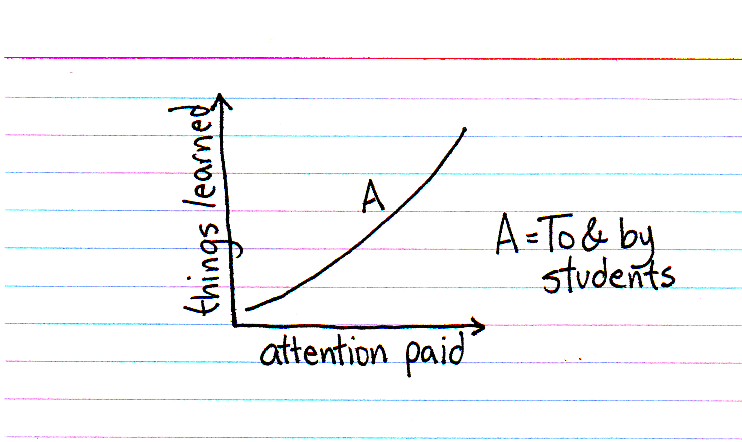
I love Indexed. It's simple but oh so smart and I just had to share this neat graph. It's so straightforward right? As a student, the more attention my teacher gives me, the more things I'll want to learn. Maybe because I know that my teacher cares enough about me and that makes me want to care too about what I'm learning. Question is, in a class of 40 students how do we give our undivided attention? Multiply 40 children by say, 5 classes and you have 200 students in a week to pay attention to. No wonder, teachers are so drained by Friday.
Adam vs Mrs Xing (What I would have done different)
This post is for ICT e-learning task Scenario 2, Activity D.
1. Wikis!
Set-up a wiki page that acts as a depository for instructions, information, links, resources, etc. The wiki page would be accessible to anyone but administrative privileges would still belong to me (the teacher). I believe this is a more efficient way to disseminate information compared to uploading Powerpoint slides on the school's Learning Management System (LMS).
It will help to sidestep the problem of students being unable to access the Powerpoint slides which could be caused by various factors such as software incompatibility; lack of bandwidth since the whole school population will be accessing the LMS during that week; navigation issues on less user-friendly LMS model; and just plain logging in issues like incorrect user identification or password.
With the lesson activity posted for all to see, Mrs Xing would also have 'protected' herself from accusations that surfing undesirable websites were part of her e-learning lesson.
2. Reflections
Having the wiki platform in place, I would then require that my students post their reflections of the activity on their group's wiki page. The reflections would act as a counter to the all too easy copy-and-paste method of some of the less industrious students. Students may not be so prone to plagiarism if they know that they have to think about and share their thoughts on what they are doing. Some forms of reflection employed could be the 3-2-1 method or the KWLQ framework. As a deterrent, any forms of plagiarism will be dealt with strictly ranging from being ungraded to detention depending on the extent of the copying.
3. Cyberwellness education
Before the start of e-learning week, I would take a session to highlight the issues of Cyberwellness to the students face to face. The session would touch on the two principles of Cyberwellness: 'Respect for Others' and 'Safe and Responsible Use'. Relevant links would also be put up on the wiki page to reinforce the concept of Cyberwellness.
4. Involving parents
Prior to e-learning week, if the school has not already done so, I would inform parents through e-mail or letter about the nature of e-learning week and some of the precautions that they can take in their child's online learning journey. I would include advice such as use of family-safe internet filters, location of the family computer and appropriate parental supervision.
Sources:
Chai, Ching Sing; ICT for self-directed and collaborative learning; Chapter 8
1. Wikis!
Set-up a wiki page that acts as a depository for instructions, information, links, resources, etc. The wiki page would be accessible to anyone but administrative privileges would still belong to me (the teacher). I believe this is a more efficient way to disseminate information compared to uploading Powerpoint slides on the school's Learning Management System (LMS).
It will help to sidestep the problem of students being unable to access the Powerpoint slides which could be caused by various factors such as software incompatibility; lack of bandwidth since the whole school population will be accessing the LMS during that week; navigation issues on less user-friendly LMS model; and just plain logging in issues like incorrect user identification or password.
With the lesson activity posted for all to see, Mrs Xing would also have 'protected' herself from accusations that surfing undesirable websites were part of her e-learning lesson.
2. Reflections
Having the wiki platform in place, I would then require that my students post their reflections of the activity on their group's wiki page. The reflections would act as a counter to the all too easy copy-and-paste method of some of the less industrious students. Students may not be so prone to plagiarism if they know that they have to think about and share their thoughts on what they are doing. Some forms of reflection employed could be the 3-2-1 method or the KWLQ framework. As a deterrent, any forms of plagiarism will be dealt with strictly ranging from being ungraded to detention depending on the extent of the copying.
3. Cyberwellness education
Before the start of e-learning week, I would take a session to highlight the issues of Cyberwellness to the students face to face. The session would touch on the two principles of Cyberwellness: 'Respect for Others' and 'Safe and Responsible Use'. Relevant links would also be put up on the wiki page to reinforce the concept of Cyberwellness.
4. Involving parents
Prior to e-learning week, if the school has not already done so, I would inform parents through e-mail or letter about the nature of e-learning week and some of the precautions that they can take in their child's online learning journey. I would include advice such as use of family-safe internet filters, location of the family computer and appropriate parental supervision.
Sources:
Chai, Ching Sing; ICT for self-directed and collaborative learning; Chapter 8
Wednesday, September 2, 2009
Eugene's response to E-learning activity, Scenario 1-Activity B
Scenario 1, Activity B
Survey on Computer Literacy
Mrs Xing has several implementation issues which could be avoided. First and foremost, Mrs Xing could have asked prior to the lesson, as to how many of the students had prior computer knowledge before the actual lesson in the lab. This could be in the form of a survey for example, which asks for computer literacy levels.
Assignment of Computer Literate Students
If her class has a size of 40, Mrs Xing should then assign 1computer literate student to 3 students, and if there are any extra computer literate students or (appointed computer reps), they can help out any other student who needs help. This is to be done beforehand.
Establishment of Rules and Regulations
Mrs Xing then has to establish rules and regulations before classes start. 1) She could establish that no computers are to be switched on until she instructs so. 2) The computer reps are then to sit with a non-computer literate student. Once Mrs Xing instructs students to switch on their computers, computer reps are to start their own computers, show the other 3 attachees how to start and load up the computer. Following that the students will try it on their own.
Signalling attention or for help
Mrs Xing then could use colored cups as highlighted in the video. Blue signals everything’s ok, and red signaling that help is required. Students could put the red cups up once they have problems, and the nearest computer rep is to attend to the student requiring help.
Signalling for students' attention
She could establish that should she require student’s attention she will dim the lights (as per the video). Another alternative is for Mrs Xing to see if the school has a master software which controls the computers in the lab.
Editing Of Work and submission
Mrs Xing could assign each student to another, so that students are able to edit each other’s work and offer opinions and criticism. They are to use the track changes tool for this. This will allow better use of student’s time, especially when they finish all about the same time. The students are then to revise their narratives and then submit it to Mrs Xing’s shared folder for her action after class. This will also allow students a chance to ‘manage their time and conduct self-check on their progress...’ (textbook)
Hopefully with these implementations in place, her english lesson using ict could run more effectively.
Survey on Computer Literacy
Mrs Xing has several implementation issues which could be avoided. First and foremost, Mrs Xing could have asked prior to the lesson, as to how many of the students had prior computer knowledge before the actual lesson in the lab. This could be in the form of a survey for example, which asks for computer literacy levels.
Assignment of Computer Literate Students
If her class has a size of 40, Mrs Xing should then assign 1computer literate student to 3 students, and if there are any extra computer literate students or (appointed computer reps), they can help out any other student who needs help. This is to be done beforehand.
Establishment of Rules and Regulations
Mrs Xing then has to establish rules and regulations before classes start. 1) She could establish that no computers are to be switched on until she instructs so. 2) The computer reps are then to sit with a non-computer literate student. Once Mrs Xing instructs students to switch on their computers, computer reps are to start their own computers, show the other 3 attachees how to start and load up the computer. Following that the students will try it on their own.
Signalling attention or for help
Mrs Xing then could use colored cups as highlighted in the video. Blue signals everything’s ok, and red signaling that help is required. Students could put the red cups up once they have problems, and the nearest computer rep is to attend to the student requiring help.
Signalling for students' attention
She could establish that should she require student’s attention she will dim the lights (as per the video). Another alternative is for Mrs Xing to see if the school has a master software which controls the computers in the lab.
Editing Of Work and submission
Mrs Xing could assign each student to another, so that students are able to edit each other’s work and offer opinions and criticism. They are to use the track changes tool for this. This will allow better use of student’s time, especially when they finish all about the same time. The students are then to revise their narratives and then submit it to Mrs Xing’s shared folder for her action after class. This will also allow students a chance to ‘manage their time and conduct self-check on their progress...’ (textbook)
Hopefully with these implementations in place, her english lesson using ict could run more effectively.
Subscribe to:
Posts (Atom)